GenAI "Text-to-Video" | OpusClip AI-Powered Video Generating Tool
GenAI "Text-to-Video" | OpusClip AI-Powered Video Generating Tool
GenAI "Text-to-Video"
Opus Clip AI-Powered Video Generating Tool
Designed the AI video-generating feature for the Opus Clip mobile app, integrating AI script writing and storyboard editing for efficient mobile video production.
Designed the AI video-generating feature for the Opus Clip mobile app, integrating AI script writing and storyboard editing for efficient mobile video production.
Designed the AI video-generating feature for the Opus Clip mobile app, integrating AI script writing and storyboard editing for efficient mobile video production.
Under Development
Under Development
Under Development
Generative AI
Generative AI
Generative AI
Mobile
Mobile
Mobile
UXUI
UXUI
UXUI
Product Design
Product Design
Product Design
Summer 2024
Summer 2024
Summer 2024
Overview
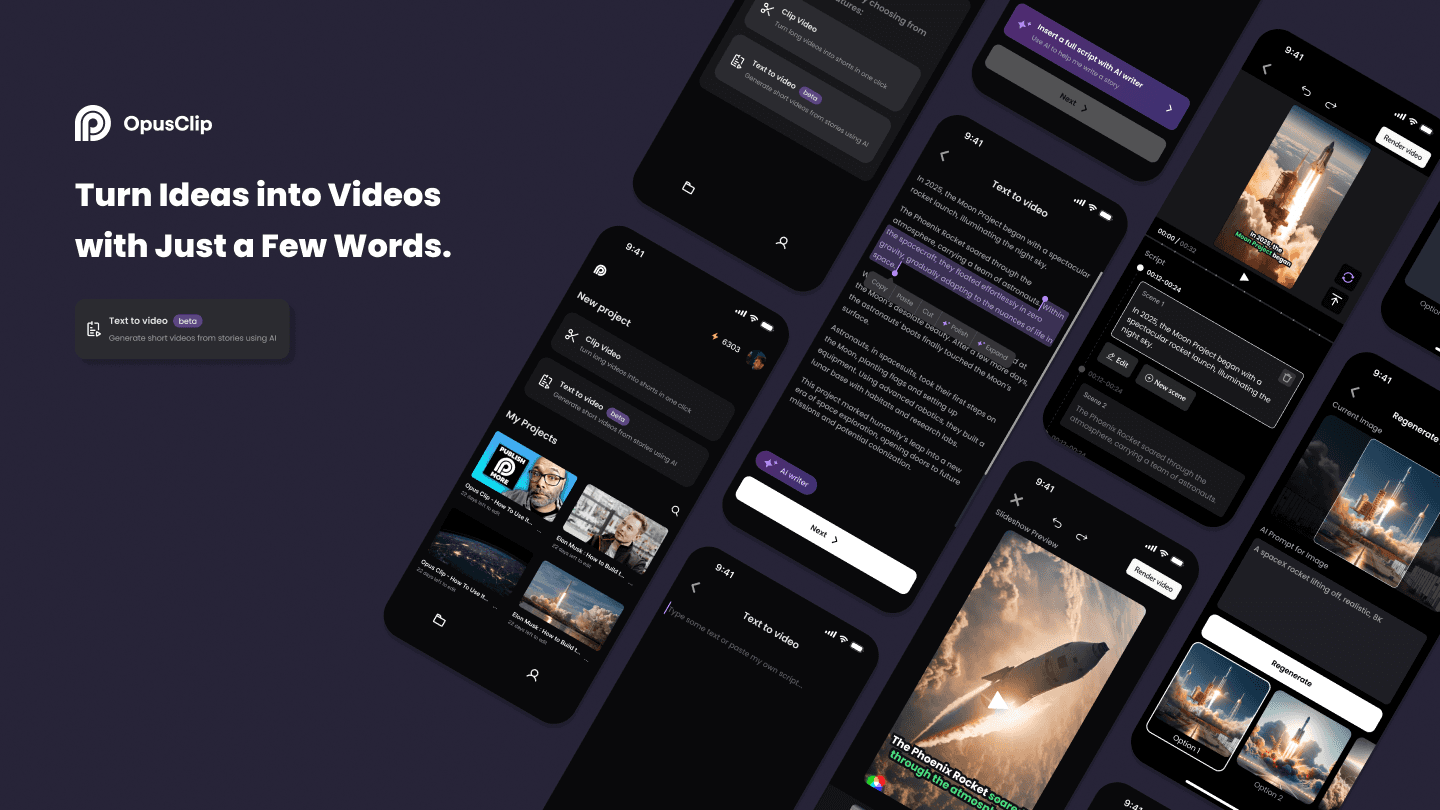
I designed the AI 'text-to-video' workflow, integrating AI functionality into script writing and storyboard editing for Opus Clip's upcoming mobile app.
I designed the AI 'text-to-video' workflow, integrating AI functionality into script writing and storyboard editing for Opus Clip's upcoming mobile app.
I designed the AI 'text-to-video' workflow, integrating AI functionality into script writing and storyboard editing for Opus Clip's upcoming mobile app.
My role
User Experience Designer (Contract)
User Experience Designer (Contract)
Timeline & Status
3 months, Summer 2024
Feature currently under development
3 months, Summer 2024
Feature currently under development
Collaboration
Design Lead, Product Manager, Engineer
Design Lead, Product Manager, Engineer
What I did
Product design, UXUI, Research, Storyboarding, Wireframing, User testing, Prototyping
Product design, UXUI, Research, Storyboarding, Wireframing, User testing, Prototyping
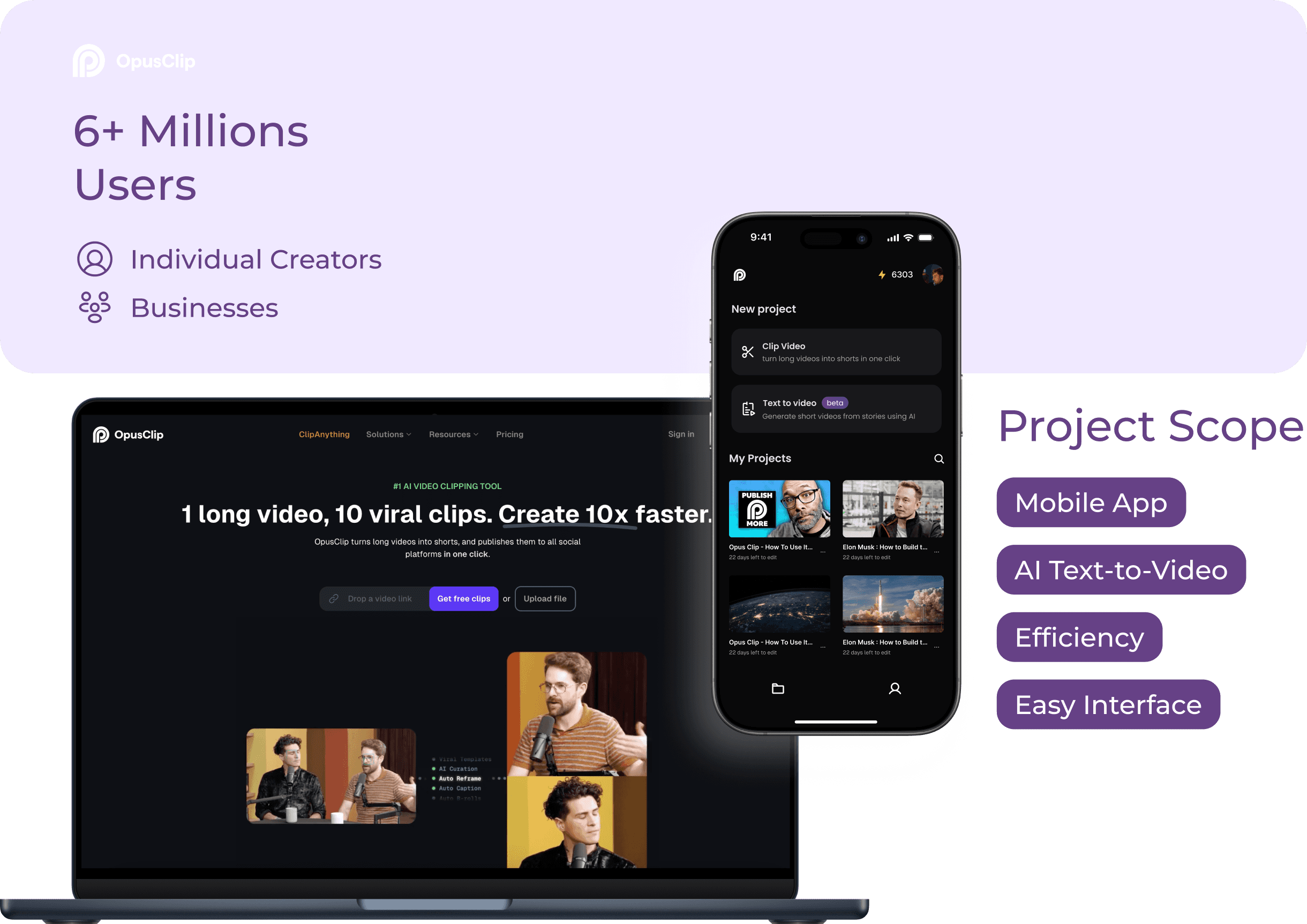
OpusClip is the U.S.'s leading AI video tool with 6M+ global users.
OpusClip is the U.S.'s leading AI video tool with 6M+ global users.
OpusClip is the U.S.'s leading AI video tool with 6M+ global users.
Problems
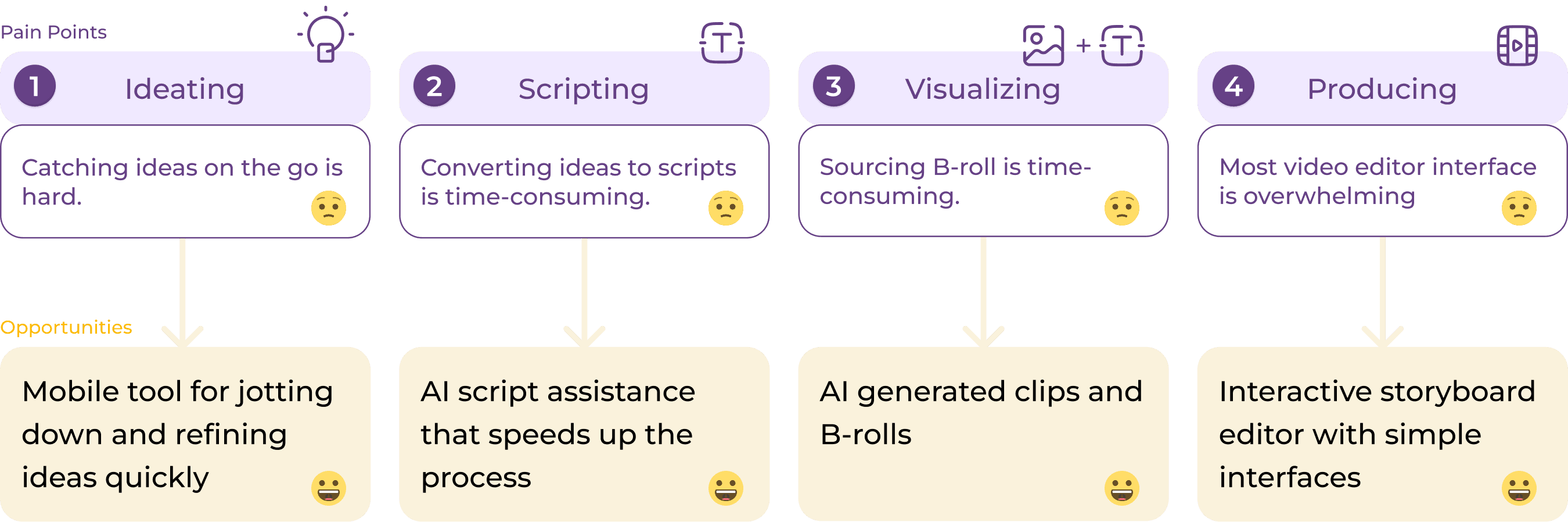
Content creators face a slow, complex, and uninspiring process when transforming ideas into videos.
Content creators face a slow, complex, and uninspiring process when transforming ideas into videos.
Content creators face a slow, complex, and uninspiring process when transforming ideas into videos.
Solution
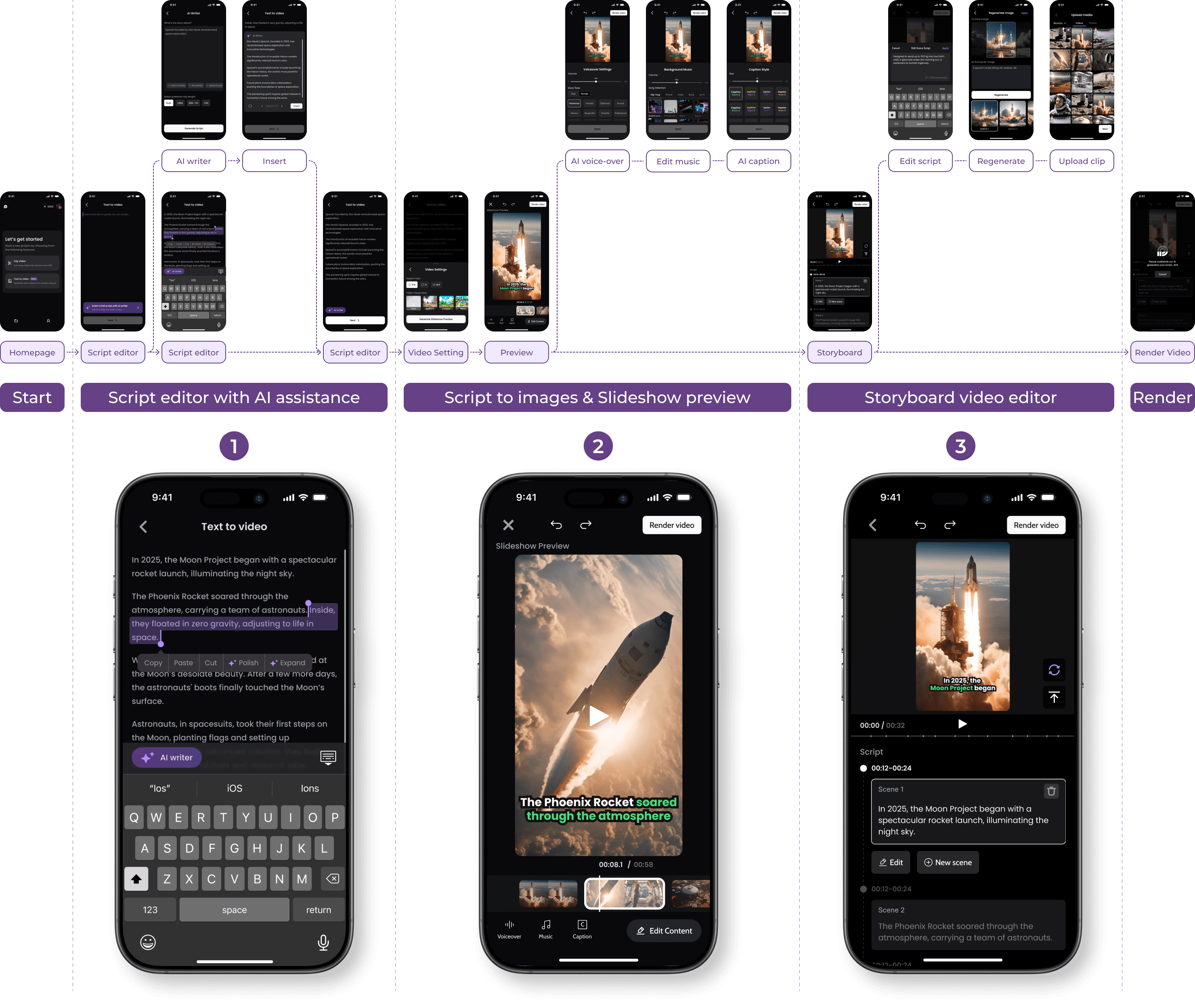
Streamlined the user flow into 3 simple steps, leveraging AI to enhance efficiency and save time.
Streamlined the user flow into 3 simple steps, leveraging AI to enhance efficiency and save time.
Streamlined the user flow into 3 simple steps, leveraging AI to enhance efficiency and save time.
Outcome
Outcome
50%
50%
50%
Increased user satisfaction by 50% between 2 rounds of user testing
Increased user satisfaction by 50% between 2 rounds of user testing
80%
80%
80%
Reduced video creation time by 80% by leveraging AI
Reduced video creation time by 80% by leveraging AI
Innovation
Innovation
Innovation
Innovated a storyboard video editor, redefining the video editing workflow for efficiency
Innovated a storyboard video editor, redefining the video editing workflow for efficiency
- Design Process -
Design Decision 01 - Script Editor
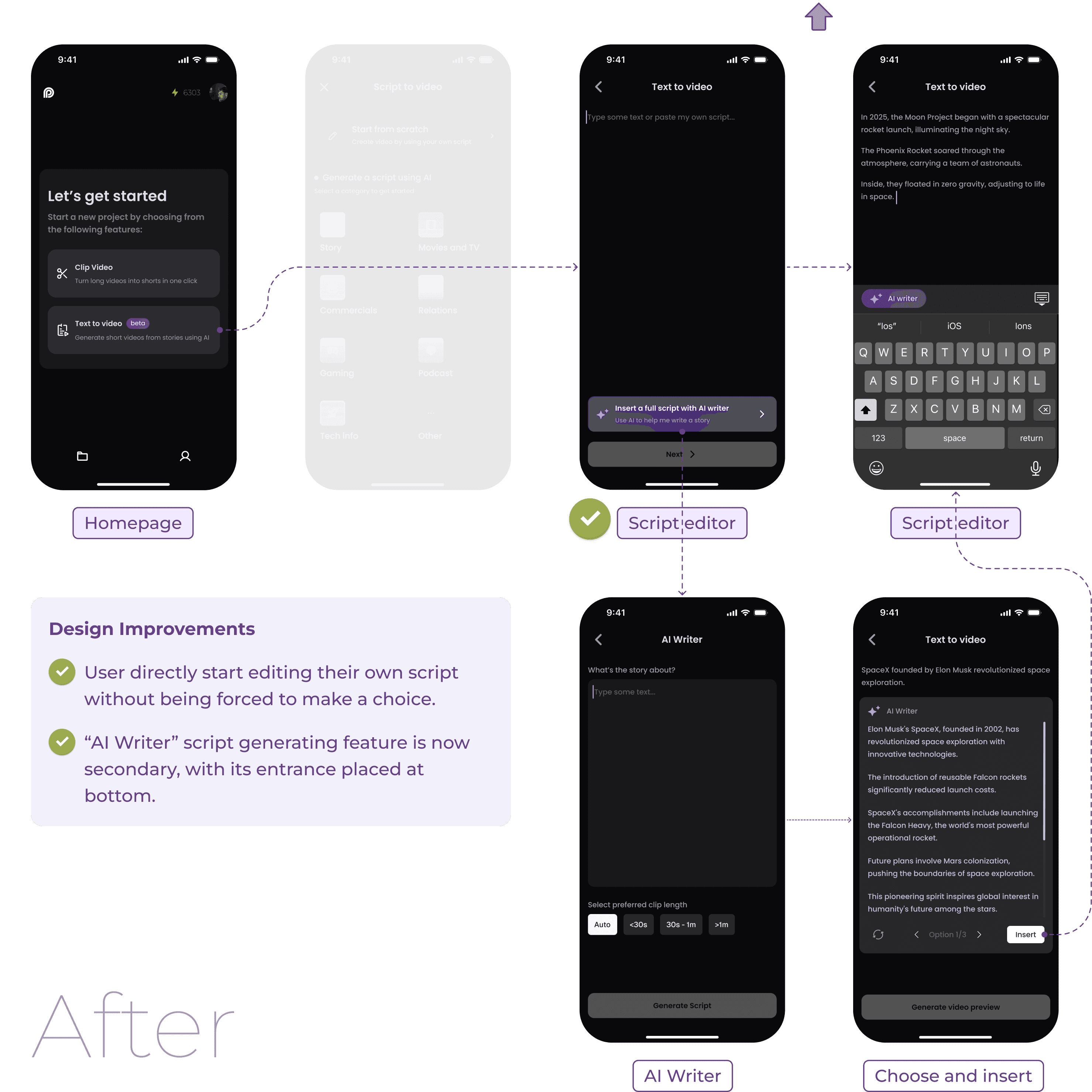
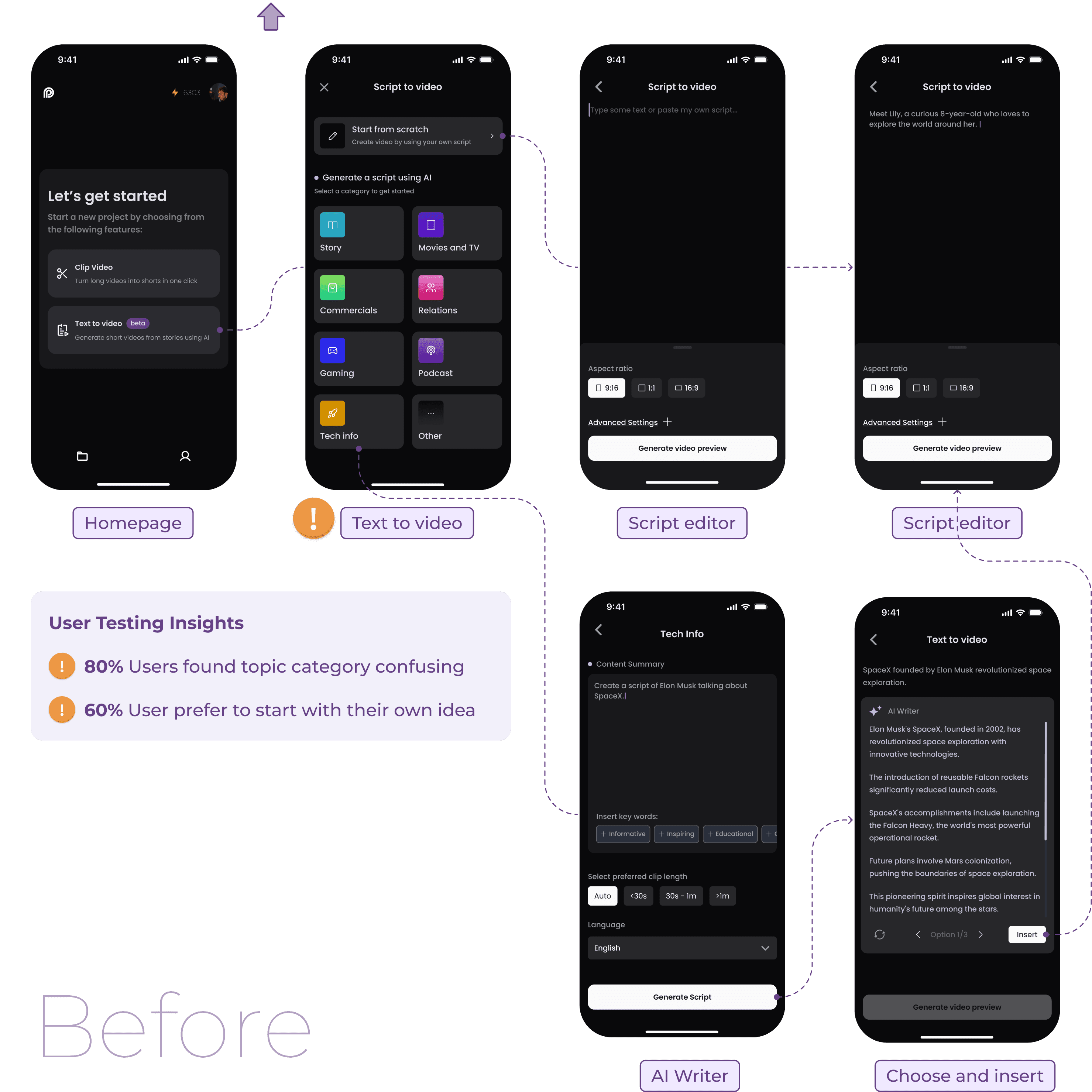
Removing a single frame, I clarified the user flow and improved overall functionality.
Removing a single frame, I clarified the user flow and improved overall functionality.
Removing a single frame, I clarified the user flow and improved overall functionality.

Design Decision 01 Outcome
Script Editor
Script Editor
Script Editor
User can directly start to paste or type their own script without being forced to make a choice.
User can directly start to paste or type their own script without being forced to make a choice.
User can directly start to paste or type their own script without being forced to make a choice.
Script Editor - AI Assistant
Script Editor - AI Assistant
Script Editor - AI Assistant
"Keep Writing"
"Keep Writing"
"Keep Writing"
Automatically complete the script based on the written content
Automatically complete the script based on the written content
"Polish"
"Polish"
"Polish"
Polish selected script, leverage AI in your writing with more precision
Polish selected script, leverage AI in your writing with more precision
"Expand"
"Expand"
"Expand"
Expand selected script, leverage AI in your writing with more precision
Expand selected script, leverage AI in your writing with more precision
AI Writer
AI Writer
AI Writer
Users can insert the generated script into the script editor as plain text.
Therefore, the “AI writer” became an intuitive feature that is smoothly embedded with the script editor.
Users can insert the generated script into the script editor as plain text.
Therefore, the “AI writer” became an intuitive feature that is smoothly embedded with the script editor.
Users can insert the generated script into the script editor as plain text.
Therefore, the “AI writer” became an intuitive feature that is smoothly embedded with the script editor.
Design Decision 02 - Storyboard Video Editor
Design Decision 02 - Storyboard Video Editor
We Innovated a storyboard video editor that pairs scripts with clips for easy operation.
We Innovated a storyboard video editor that pairs scripts with clips for easy operation.
We Innovated a storyboard video editor that pairs scripts with clips for easy operation.
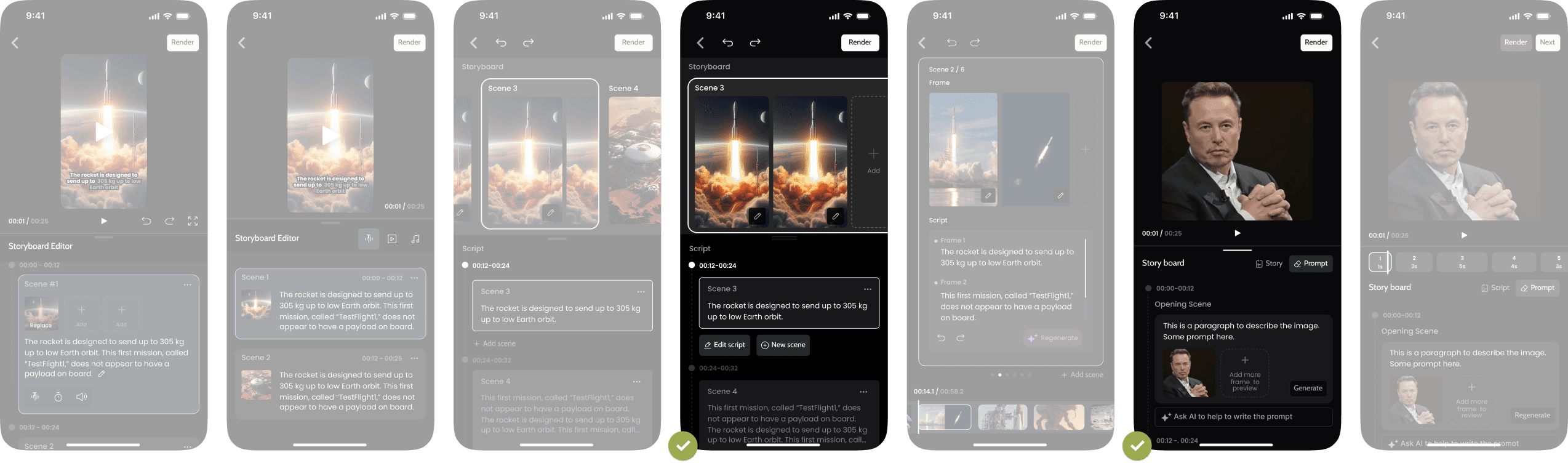
The challenge is to balance functionality and usability on a limited mobile screen.
The challenge is to balance functionality and usability on a limited mobile screen.
The challenge is to balance functionality and usability on a limited mobile screen.
Problem 1
1 script with 1 clip or 1 script with multiple clips?
Problem 1
1 script with 1 clip or 1 script with multiple clips?
Problem 2
Where is the best placement for the regenerate button?
Problem 2
Where is the best placement for the regenerate button?
Collaborating with users provided valuable insights through user testing.
Collaborating with users provided valuable insights through user testing.
Collaborating with users provided valuable insights through user testing.
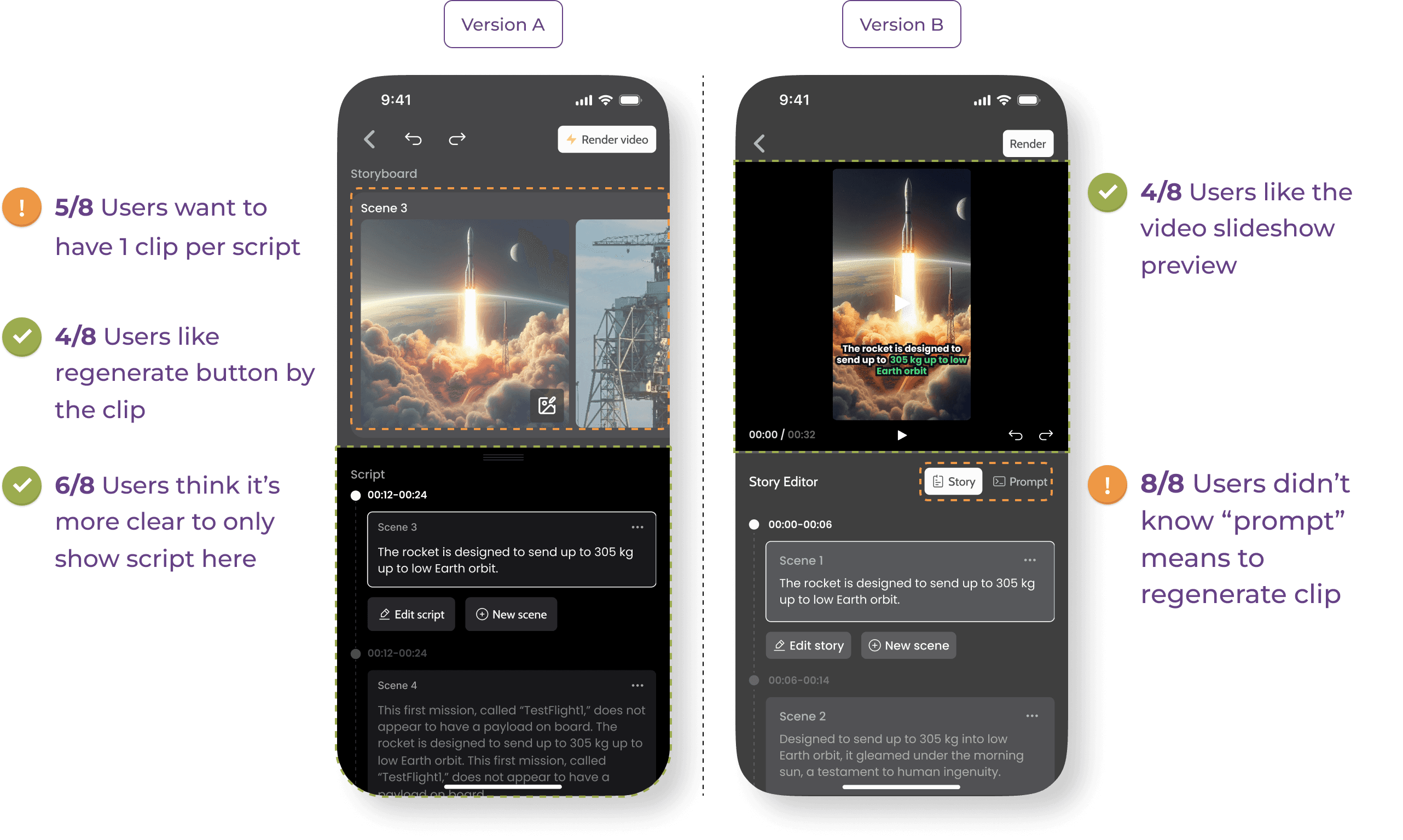
Design Decision 02 Outcome
Storyboard Editor
Storyboard Editor
Storyboard Editor
Solution 1:
1 script with 1 clip
An editor layout that links script with clip, letting users more easily make correlations between the two.
Solution 1:
1 script with 1 clip
An editor layout that links script with clip, letting users more easily make correlations between the two.
Storyboard Editor
- Regenerate
Storyboard Editor
- Regenerate
Storyboard Editor
- Regenerate
Solution 2:
Regenerate button by the clips
3 key elements in one screen
Current image
Prompt of current image
Regenerated options
Solution 2:
Regenerate button by the clips
3 key elements in one screen
Current image
Prompt of current image
Regenerated options

See also…