"Text-to-Video" | AI-Powered Video Creation Tool B2B/B2C
"Text-to-Video" | AI-Powered Video Creation Tool B2B/B2C
Text-to-Video |B2C Video Clip Tool Powered by Gen AI
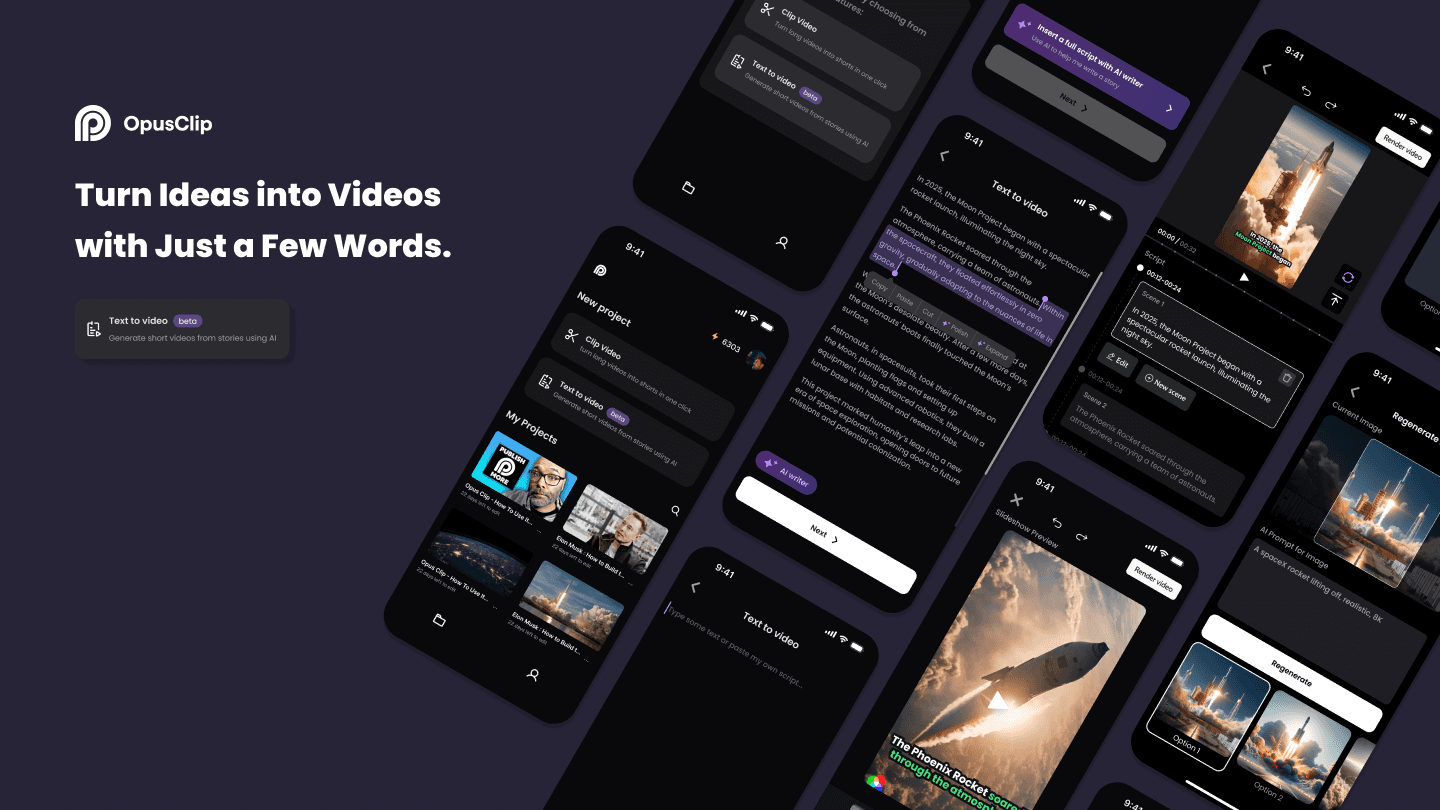
Developed the 'text-to-video' feature for the Opus Clip mobile app, creating a seamless workflow that integrates AI-driven script generation and storyboard editing, enabling efficient and intuitive mobile video production.
Developed the 'text-to-video' feature for the Opus Clip mobile app, creating a seamless workflow that integrates AI-driven script generation and storyboard editing, enabling efficient and intuitive mobile video production.
Developed the 'text-to-video' feature for the Opus Clip mobile app, creating a seamless workflow that integrates AI-driven script generation and storyboard editing, enabling efficient and intuitive mobile video production.
Generative AI
Generative AI
Generative AI
UXUI
UXUI
UXUI
Product Design
Product Design
Product Design
Summer 2024
Summer 2024
Summer 2024
My role
User Experience Designer (Contract)
User Experience Designer (Contract)
User Experience Designer (Contract)
What I did
Product design, UXUI, Research, Storyboarding, Wireframing, User testing, Prototyping
Product design, UXUI, Research, Storyboarding, Wireframing, User testing, Prototyping
Product design, UXUI, Research, Storyboarding, Wireframing, User testing, Prototyping
Collaboration
Design Lead, Product Manager, Engineer
Design Lead, Product Manager, Engineer
Design Lead, Product Manager, Engineer
Duration
3 months, Summer 2024
3 months, Summer 2024
3 months, Summer 2024
Context
Opus Clip, the U.S.'s leading AI video tool with 6M+ creators and businesses, is launching a mobile app for fast video clipping and instant idea visualization.
Opus Clip, the U.S.'s leading AI video tool with 6M+ creators and businesses, is launching a mobile app for fast video clipping and instant idea visualization.
Opus Clip, the U.S.'s leading AI video tool with 6M+ creators and businesses, is launching a mobile app for fast video clipping and instant idea visualization.
Our team developed a 'text-to-video' feature that uses AI to turn text into scripts and sketch videos, giving users a simple, mobile-friendly tool for quick, editable video creation.
Our team developed a 'text-to-video' feature that uses AI to turn text into scripts and sketch videos, giving users a simple, mobile-friendly tool for quick, editable video creation.
Our team developed a 'text-to-video' feature that uses AI to turn text into scripts and sketch videos, giving users a simple, mobile-friendly tool for quick, editable video creation.
Problems
Turning ideas into videos is slow, complex, and uninspiring.
Turning ideas into videos is slow, complex, and uninspiring.
Turning ideas into videos is slow, complex, and uninspiring.
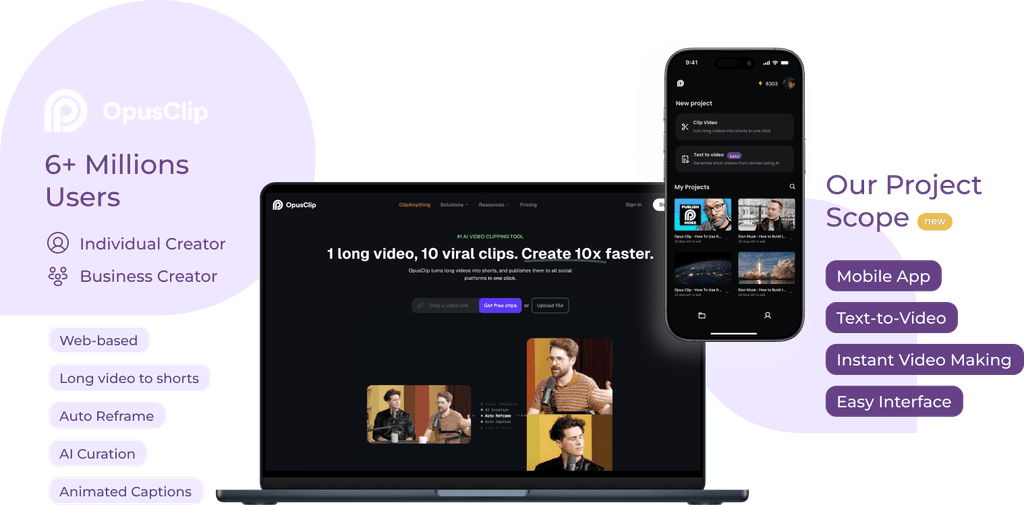
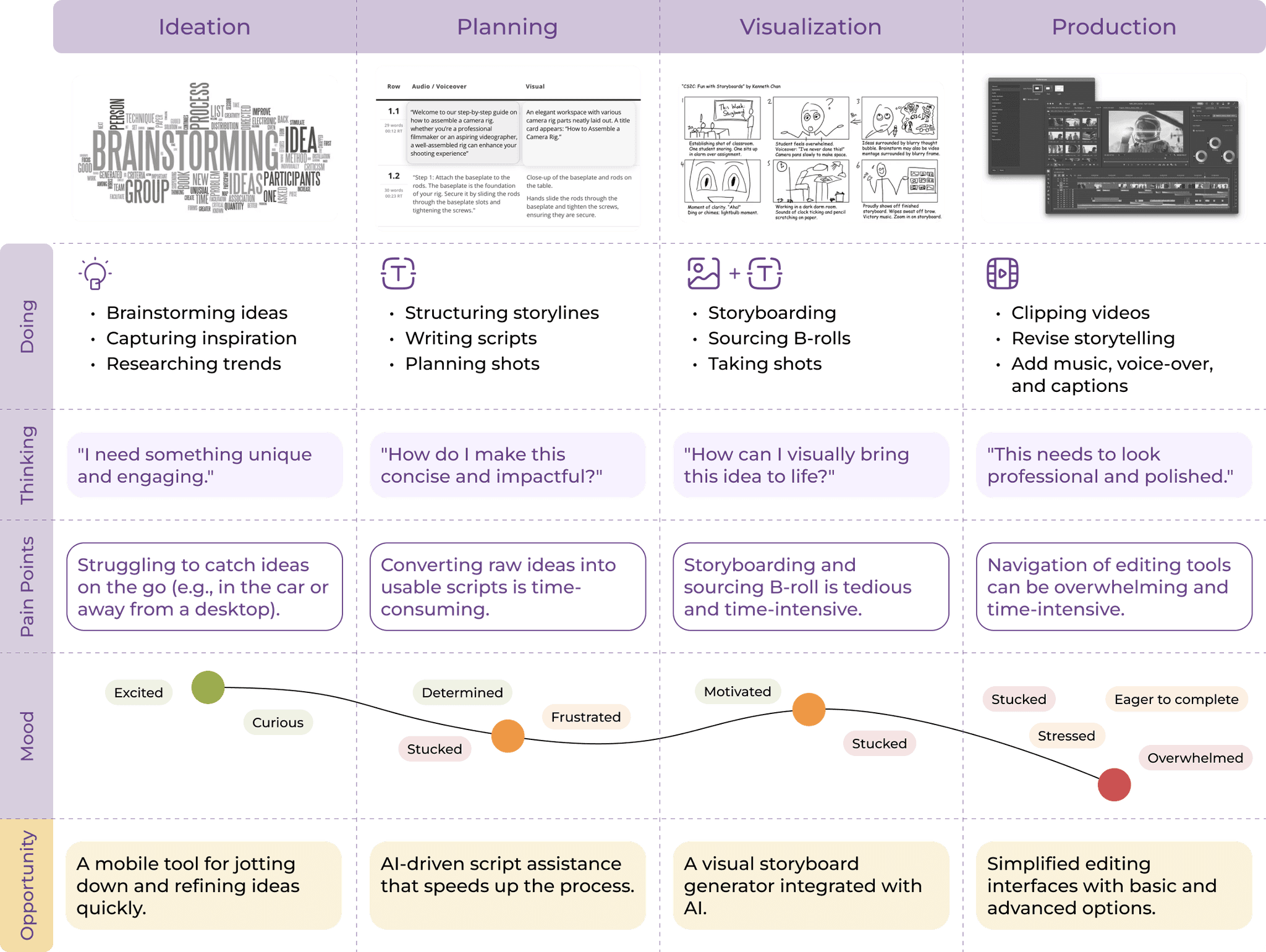
Users often feel stuck when writing scripts. Video production takes a lot of effort, with constant revisions—reworking scripts, editing storyboards, re-recording audio, and refining cuts. The process is slowed down by complex UIs and steep learning curves, costing users time and energy.
Users often feel stuck when writing scripts. Video production takes a lot of effort, with constant revisions—reworking scripts, editing storyboards, re-recording audio, and refining cuts. The process is slowed down by complex UIs and steep learning curves, costing users time and energy.
Users often feel stuck when writing scripts. Video production takes a lot of effort, with constant revisions—reworking scripts, editing storyboards, re-recording audio, and refining cuts. The process is slowed down by complex UIs and steep learning curves, costing users time and energy.
Solution
Effortless Mobile Video Creation with AI: Script Editor and Storyboard Editor
Effortless Mobile Video Creation with AI: Script Editor and Storyboard Editor
Effortless Mobile Video Creation with AI: Script Editor and Storyboard Editor
With Opus Clip’s AI Script Writer, users can effortlessly turn ideas into structured scripts, while the Editable Storyboard Generator brings these scripts to life in a visual format. Together, these tools make mobile video creation fast, intuitive, and adaptable, empowering users to produce high-quality content that aligns with their vision.
With Opus Clip’s AI Script Writer, users can effortlessly turn ideas into structured scripts, while the Editable Storyboard Generator brings these scripts to life in a visual format. Together, these tools make mobile video creation fast, intuitive, and adaptable, empowering users to produce high-quality content that aligns with their vision.
With Opus Clip’s AI Script Writer, users can effortlessly turn ideas into structured scripts, while the Editable Storyboard Generator brings these scripts to life in a visual format. Together, these tools make mobile video creation fast, intuitive, and adaptable, empowering users to produce high-quality content that aligns with their vision.
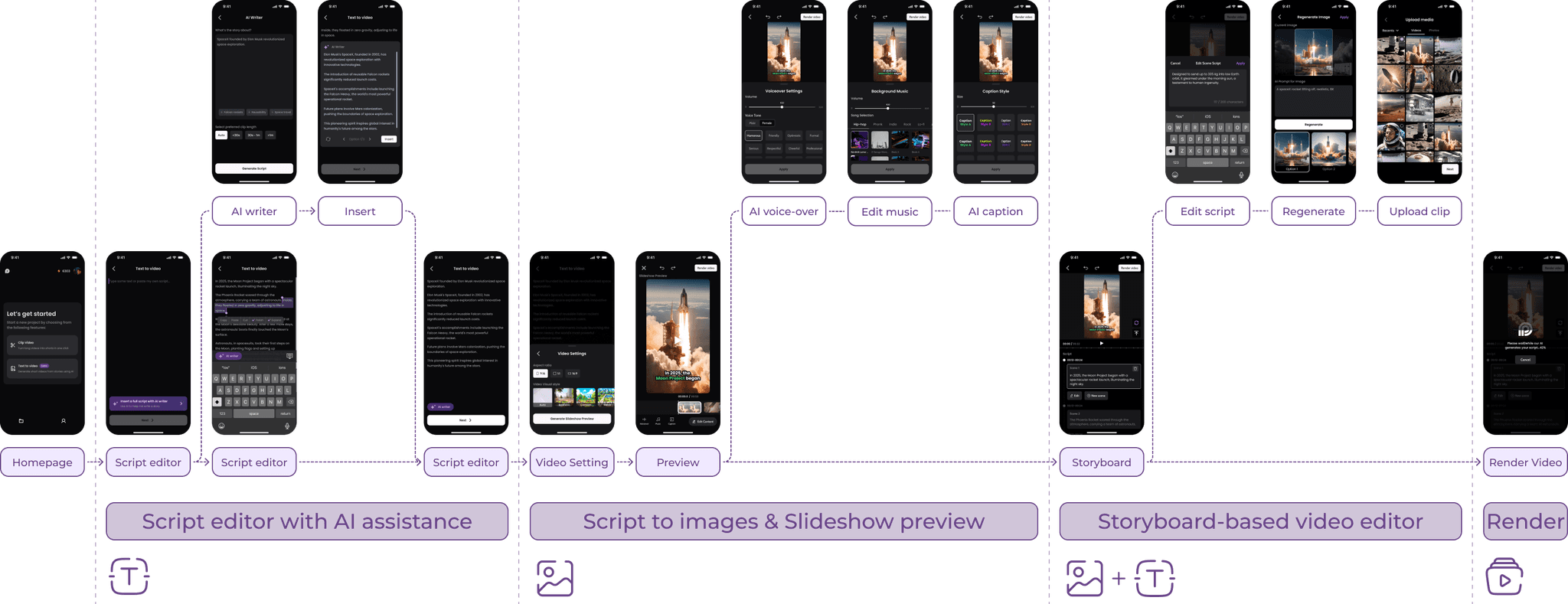
Design Decision 01 - Script Editor
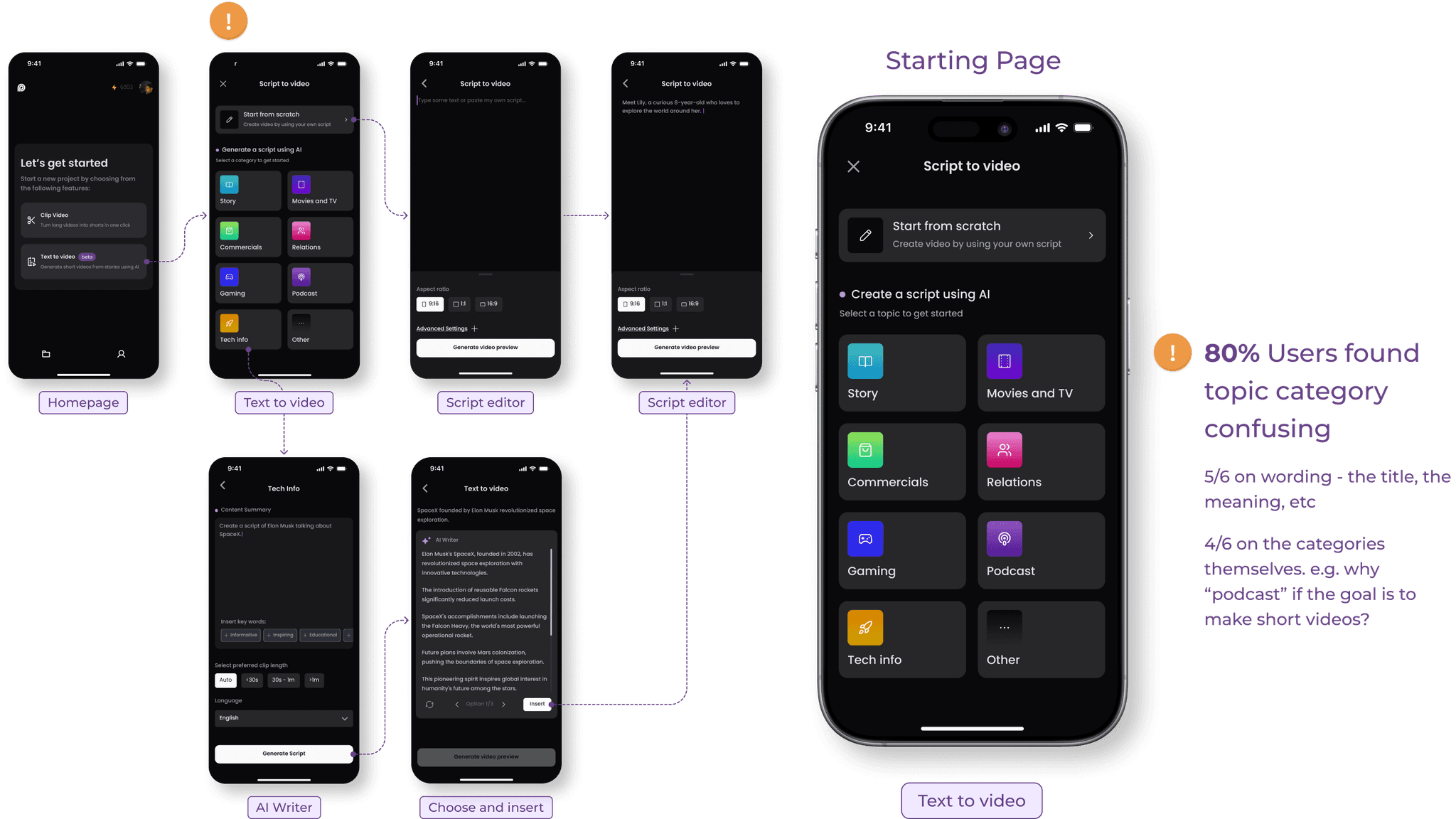
Choice Overload: 80% of users found the script editor’s starting page confusing.
Choice Overload: 80% of users found the script editor’s starting page confusing.
Choice Overload: 80% of users found the script editor’s starting page confusing.
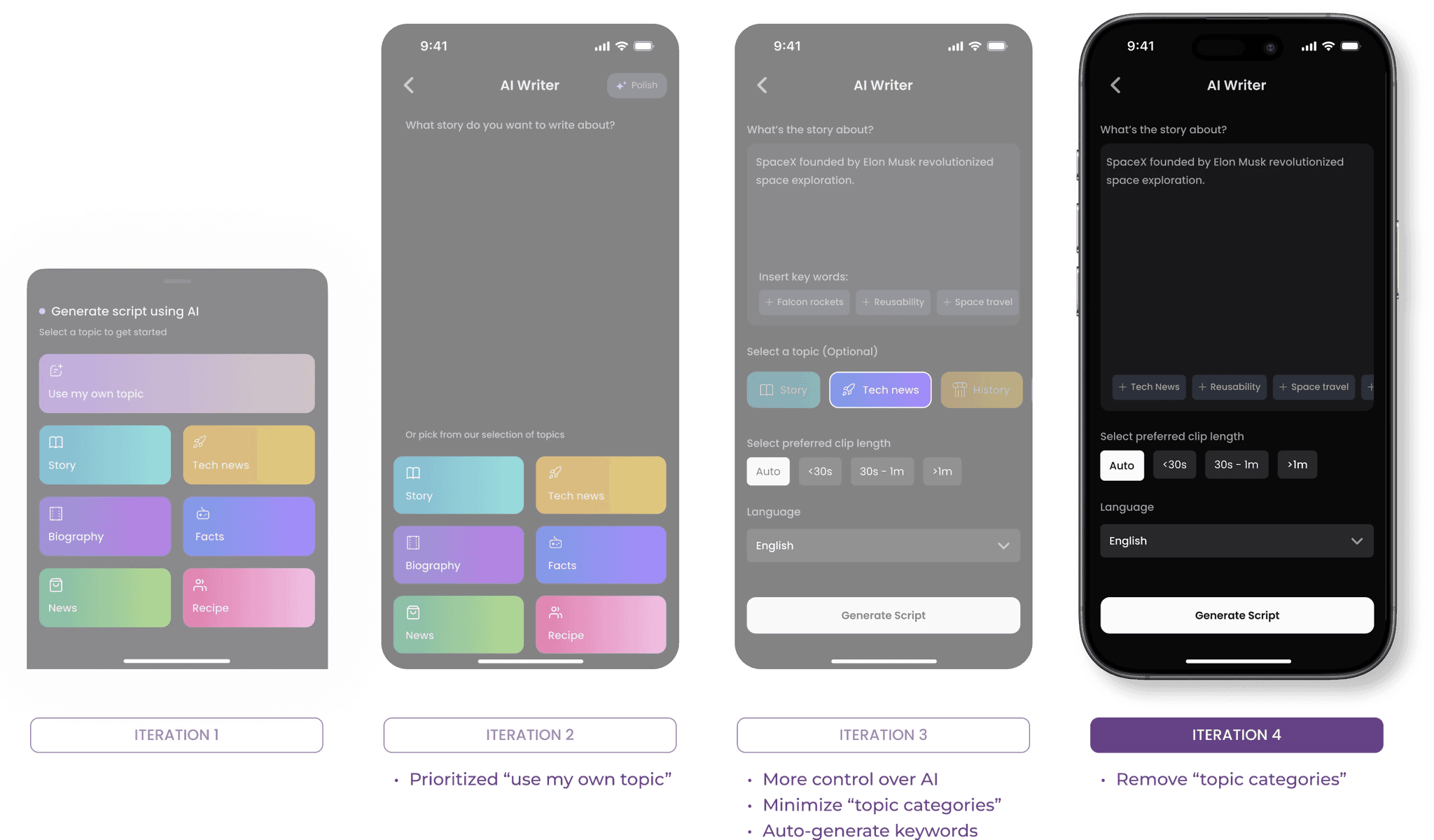
Originally, we offered two options on the Starting Page:
Script editor (write or use own script)
AI script generator (contains 8 sub-selections)
However, users are overwhelmed by too many choices and found the options unclear. Most users preferred starting with their own script, viewing AI as a helpful tool rather than a full script generator. This feedback highlights the need for a streamlined, supportive interface that keeps users in control.
Originally, we offered two options on the Starting Page:
Script editor (write or use own script)
AI script generator (contains 8 sub-selections)
However, users are overwhelmed by too many choices and found the options unclear. Most users preferred starting with their own script, viewing AI as a helpful tool rather than a full script generator. This feedback highlights the need for a streamlined, supportive interface that keeps users in control.
Originally, we offered two options on the Starting Page:
Script editor (write or use own script)
AI script generator (contains 8 sub-selections)
However, users are overwhelmed by too many choices and found the options unclear. Most users preferred starting with their own script, viewing AI as a helpful tool rather than a full script generator. This feedback highlights the need for a streamlined, supportive interface that keeps users in control.
Before
Before
Before
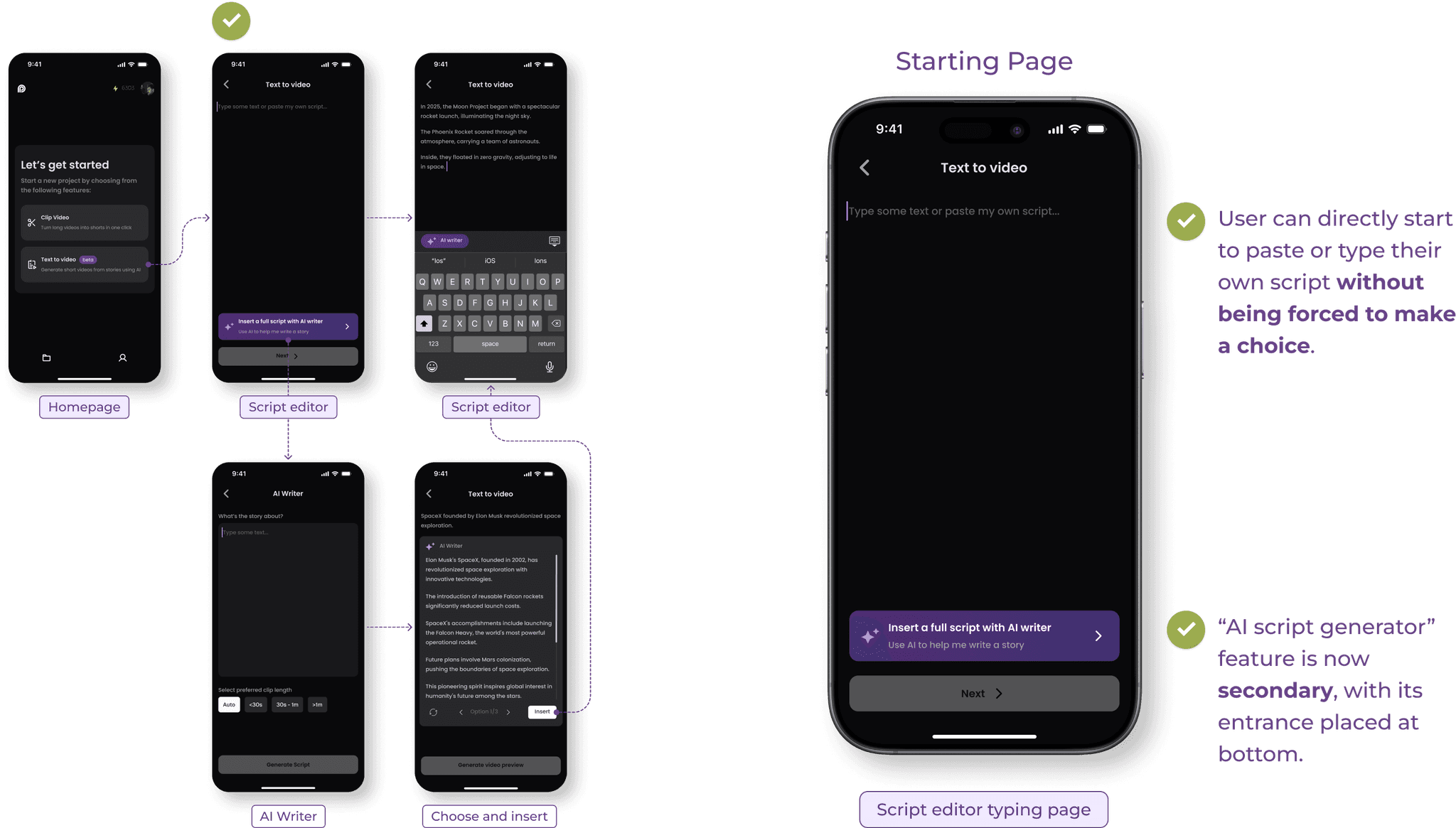
Enhancement: Users now start in the script editor, with AI tools as optional support within the editor.
Enhancement: Users now start in the script editor, with AI tools as optional support within the editor.
Enhancement: Users now start in the script editor, with AI tools as optional support within the editor.
This nudge prioritizes the Script editor over the AI script generator.
This nudge prioritizes the Script editor over the AI script generator.
This nudge prioritizes the Script editor over the AI script generator.
After
After
After
Reduced from 9 choices to 1, improving clarity and simplifying navigation for a smoother user flow.
Reduced from 9 choices to 1, improving clarity and simplifying navigation for a smoother user flow.
Reduced from 9 choices to 1, improving clarity and simplifying navigation for a smoother user flow.
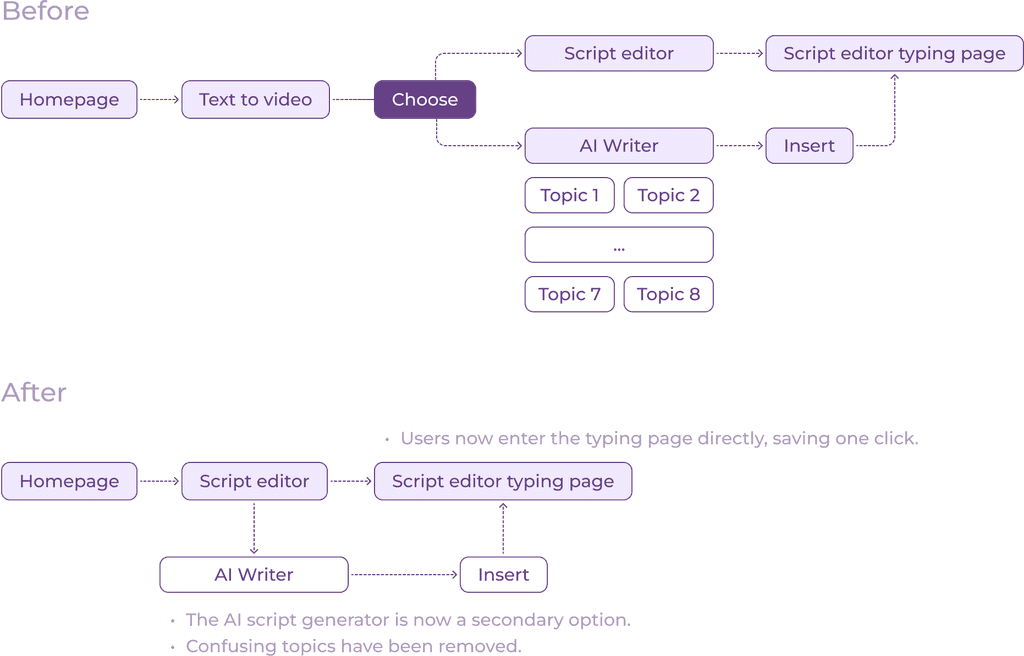
Users prefer flexibility, so we removed predefined topics from the AI script generator.
Users prefer flexibility, so we removed predefined topics from the AI script generator.
Users prefer flexibility, so we removed predefined topics from the AI script generator.
I tested multiple iterations of the AI script generator, prioritizing information based on user preferences. The findings revealed that users preferred creating their own topics rather than selecting from predefined options. After consulting with the engineering team, I determined that predefined categories were unnecessary, as users could simply input any topic for the AI to generate content. This adjustment streamlines the experience and aligns with user needs, providing greater flexibility and a more user-centered approach.
I tested multiple iterations of the AI script generator, prioritizing information based on user preferences. The findings revealed that users preferred creating their own topics rather than selecting from predefined options. After consulting with the engineering team, I determined that predefined categories were unnecessary, as users could simply input any topic for the AI to generate content. This adjustment streamlines the experience and aligns with user needs, providing greater flexibility and a more user-centered approach.
I tested multiple iterations of the AI script generator, prioritizing information based on user preferences. The findings revealed that users preferred creating their own topics rather than selecting from predefined options. After consulting with the engineering team, I determined that predefined categories were unnecessary, as users could simply input any topic for the AI to generate content. This adjustment streamlines the experience and aligns with user needs, providing greater flexibility and a more user-centered approach.
Script Editor
Script Editor
Script Editor
User can directly start to paste or type their own script without being forced to make a choice.
User can directly start to paste or type their own script without being forced to make a choice.
User can directly start to paste or type their own script without being forced to make a choice.
Script Editor - AI Assistant
Script Editor - AI Assistant
Script Editor - AI Assistant
"Keep Writing"
Automatically complete the script based on the written content
"Keep Writing"
Automatically complete the script based on the written content
"Keep Writing"
Automatically complete the script based on the written content
"Polish"
Polish selected script, leverage AI in your writing with more precision
"Polish"
Polish selected script, leverage AI in your writing with more precision
"Polish"
Polish selected script, leverage AI in your writing with more precision
"Expand"
Expand selected script, leverage AI in your writing with more precision
"Expand"
Expand selected script, leverage AI in your writing with more precision
"Expand"
Expand selected script, leverage AI in your writing with more precision
AI Writer
AI Writer
AI Writer
Users can insert the generated script into the script editor as plain text.
Therefore, the “AI writer” became an intuitive feature that is smoothly embedded with the script editor.
Users can insert the generated script into the script editor as plain text.
Therefore, the “AI writer” became an intuitive feature that is smoothly embedded with the script editor.
Users can insert the generated script into the script editor as plain text.
Therefore, the “AI writer” became an intuitive feature that is smoothly embedded with the script editor.
Design Decision 02 - Storyboard Editor
Design Decision 02 - Storyboard Editor
Creating a Visual Storyboard That Balances Functionality and Usability on a Limited Screen.
Creating a Visual Storyboard That Balances Functionality and Usability on a Limited Screen.
Creating a Visual Storyboard That Balances Functionality and Usability on a Limited Screen.
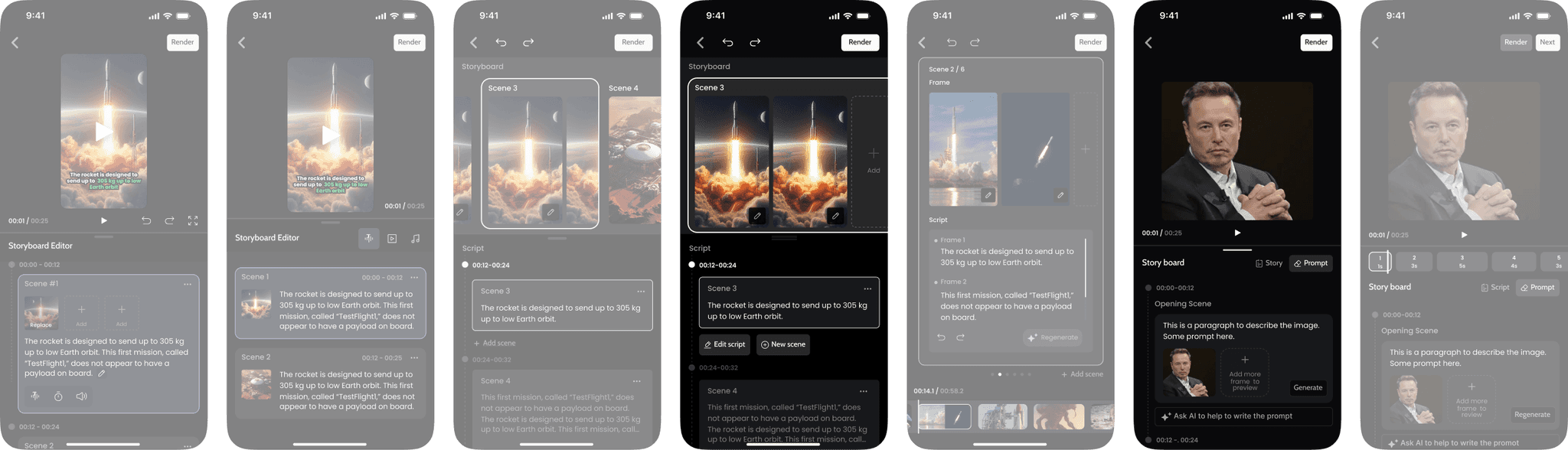
A storyboard is an essential tool for visualizing video content before it's fully developed. To enhance usability, we designed an editor layout that displays both images and text, allowing users to easily correlate the two. The key challenge is how to include and organize all necessary functions within the constraints of a limited screen size, ensuring a seamless and effective user experience.
A storyboard is an essential tool for visualizing video content before it's fully developed. To enhance usability, we designed an editor layout that displays both images and text, allowing users to easily correlate the two. The key challenge is how to include and organize all necessary functions within the constraints of a limited screen size, ensuring a seamless and effective user experience.
A storyboard is an essential tool for visualizing video content before it's fully developed. To enhance usability, we designed an editor layout that displays both images and text, allowing users to easily correlate the two. The key challenge is how to include and organize all necessary functions within the constraints of a limited screen size, ensuring a seamless and effective user experience.
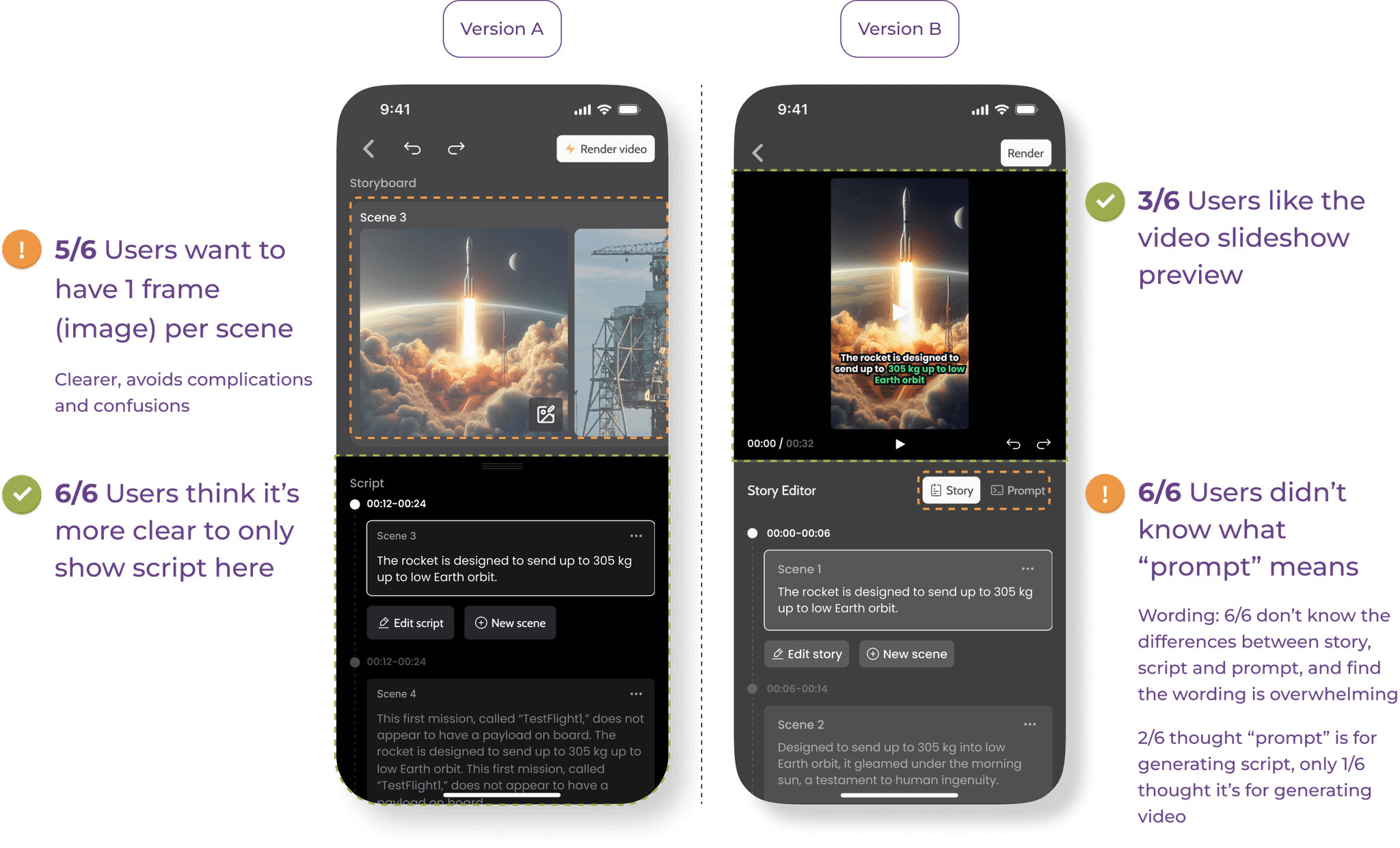
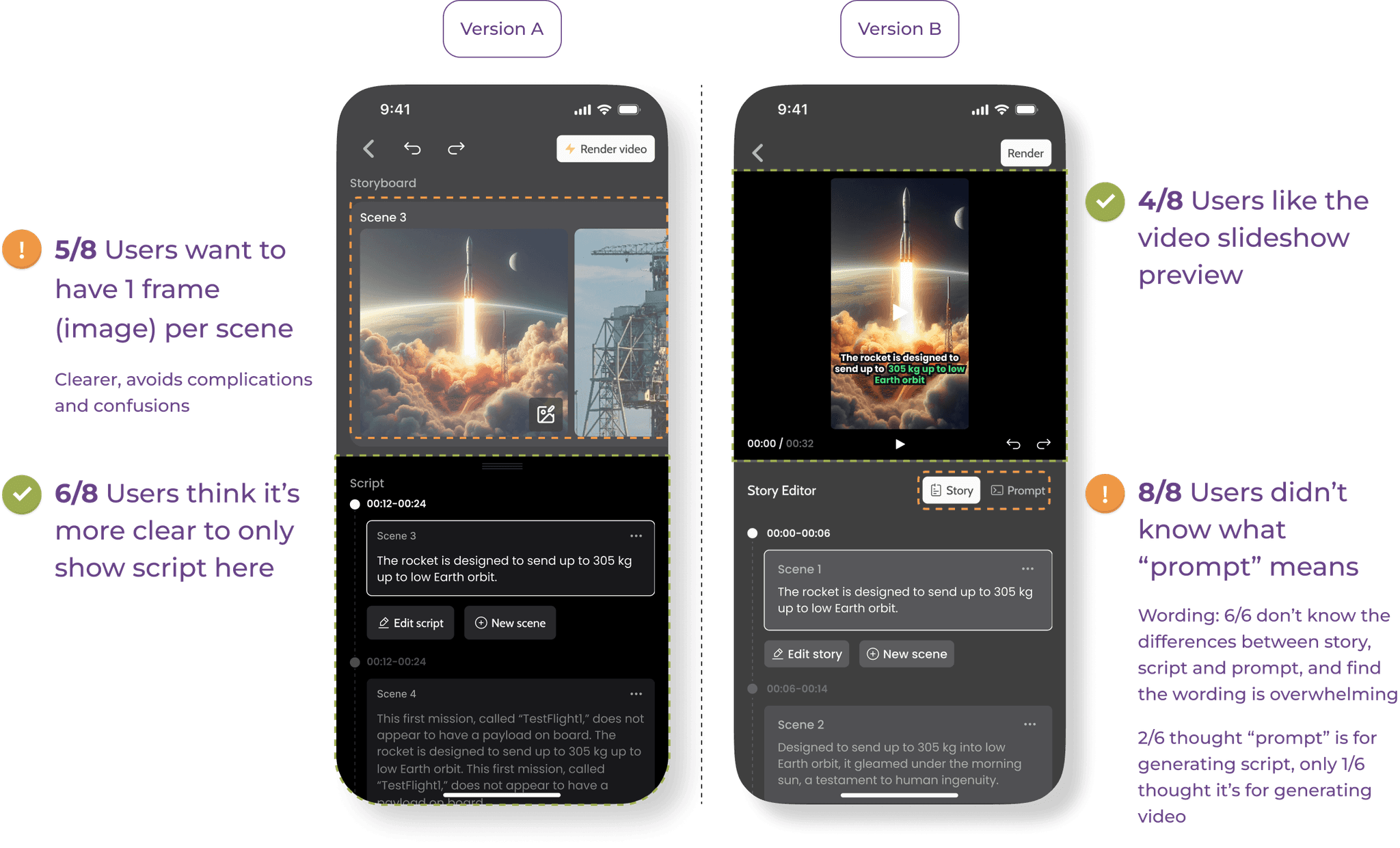
User Testing
User Testing Results
User Testing
Storyboard Editor
Storyboard Editor
Storyboard Editor
Easy Navigation
An editor layout that shows both image and text, letting users more easily make correlations between the two.
Easy Navigation
An editor layout that shows both image and text, letting users more easily make correlations between the two.
Easy Navigation
An editor layout that shows both image and text, letting users more easily make correlations between the two.
Storyboard Editor
- Regenerate
Storyboard Editor
- Regenerate
Storyboard Editor
- Regenerate
Regenerate Image Frame
3 key elements in this flow
Current image
Prompt of current image
Regenerated options
Regenerate Image Frame
3 key elements in this flow
Current image
Prompt of current image
Regenerated options
Regenerate Image Frame
3 key elements in this flow
Current image
Prompt of current image
Regenerated options
Outcome
Outcome
Redesigned the script editor and storyboard features, reducing user confusion by 80%, cutting decision points from 9 to 1, and streamlining the workflow for faster video creation. Achieved a 50% improvement in user satisfaction, with a clearer and more intuitive mobile experience.
Redesigned the script editor and storyboard features, reducing user confusion by 80%, cutting decision points from 9 to 1, and streamlining the workflow for faster video creation. Achieved a 50% improvement in user satisfaction, with a clearer and more intuitive mobile experience.
Redesigned the script editor and storyboard features, reducing user confusion by 80%, cutting decision points from 9 to 1, and streamlining the workflow for faster video creation. Achieved a 50% improvement in user satisfaction, with a clearer and more intuitive mobile experience.
Reduced video creation time by
80%
Increased user satisfaction from
25% to 75%